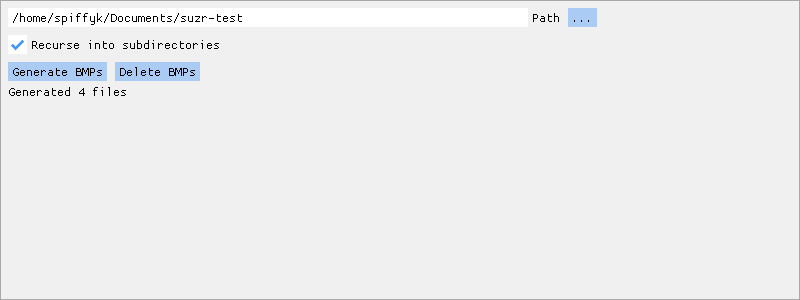
Screenshot of suzr's graphical interface
Suzanne's PSD recursor, or suzr for short, is a set of simple programs to manage bitmap conversions of files in Adobe Photoshop's PSD format. Its main goal is to provide previews of files on Microsoft Windows systems, where the default file explorer does not provide any thumbnails for PSDs.
suzr allows the user to pick a directory containing PSD files and automatically generates BMP files from them. It can also then delete the generated BMP files on demand when they are not needed anymore. On Windows, this allows the user to preview and sort through their PSD files without the need to open each of them in Photoshop to see their contents.
suzr provides a non-invasive alternative to programs that insert themselves into Windows Explorer directly, adding a PSD preview functionality. These often prove to be incompatible with new Windows Explorer versions, causing even practically system-wide breakages, since the Explorer manages the Windows desktop icons and taskbar, in addition to being the default file explorer. suzr avoids this problem completely by being a standalone program that simply generates BMP files, for which Windows Explorer has support built in directly by Microsoft.
suzr is a simple no-bullshit program written in C. Its source code is available on GitLab.
suzr was written with love for my Ace Suzanne 💖.
Screenshot of suzr's graphical interface
The simplest way to use suzr is through the suzr-gui graphical program, seen on the screenshot above. Through it, you may select the directory that contains your PSD files, and let suzr generate your desired BMP files by clicking the Generate BMPs button. The generated BMPs may then be cleaned up simply by clicking the Delete BMPs button. If you wish to generate BMPs in subdirectories as well, check the Recurse into subdirectories checkbox.
If you prefer using the command line, you may use the suzr-gen (for generation) and suzr-clean (for deletion) command line programs. These accept paths to directories containing PSD files as their arguments. By adding the --recurse option, the programs will also search through subdirectories.
Adding --version argument to either the suzr-gen or suzr-clean command makes it print its version.
All described programs work with BMPs with the extension .suzr.bmp. This is to differentiate said files from other regular BMPs files you may have in your directories. This way, suzr may safely delete its generated BMP files while leaving any other BMP files intact. Format-wise, .suzr.bmp files are just regular BMP files and any program that works with regular BMP files should be able to work with suzr-generated BMP files.
suzr directly supports and is available for download for Microsoft Windows and GNU/Linux
Download for Windows (395 KiB) · Download for GNU/Linux (517 KiB)
The initial release version.
Download for Windows (394 KiB) · Download for GNU/Linux (548 KiB)
My name is Oto Šťáva and I'm a programmer. Want to learn more about me, see more of my stuff, or contact me? See my personal website.
suzr is free software distributed under the MIT License.
suzr is in no way affiliated with or endorsed by Adobe or Microsoft Corporation.